> ## Documentation Index
> Fetch the complete documentation index at: https://docs.datarm.ai/llms.txt
> Use this file to discover all available pages before exploring further.
# Integrations Overview
> Connecting AVA to your enterprise applications
# Integrations Overview
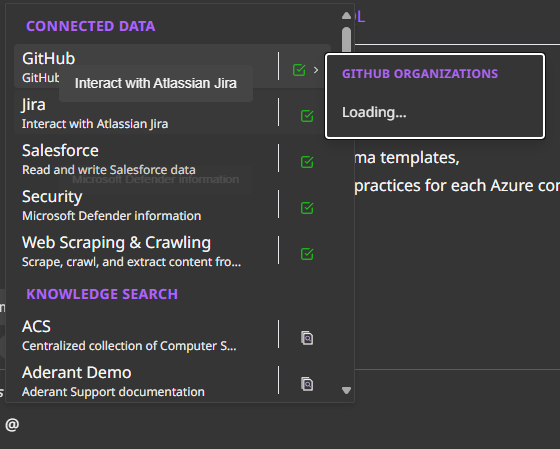
AVA uses the Model Context Protocol (MCP) to connect with your enterprise applications. Each integration runs as a dedicated Container App in your Azure tenant, using your existing SSO configuration.
**Note**: Some integration guides are still under development. Check back soon for detailed setup instructions.
## Available Integrations
 Common connection issues and solutions
Need another integration? Email [avasupport@datarm.ai](mailto:avasupport@datarm.ai)
## How MCP Integrations Work
Each integration runs as a Container App in your Azure tenant
Uses your existing SSO setup for each application (Salesforce OAuth, Jira OAuth, etc.)
Operates with user permissions—no elevated access
Users access data via simple @ mentions in conversations
## Beyond Standard Integrations
**Any Enterprise Application, One AI Assistant**: AVA can connect to virtually any application already configured in your Microsoft Entra ID with OAuth or SAML SSO.
### Leverage Your Existing SSO Infrastructure
Your organization has likely already set up dozens of enterprise applications in Microsoft Entra ID with single sign-on. AVA can extend to these applications through MCP, turning your existing SSO ecosystem into a connected AI platform.
**Examples of Additional Integrations:**
Workday, BambooHR, ADP, SAP SuccessFactors
Monday.com, Asana, ClickUp, Smartsheet
Zendesk, Freshdesk, ServiceNow, Intercom
HubSpot, Marketo, Mailchimp, Pardot
QuickBooks, Xero, Bill.com, Concur
Your internal tools with OAuth/SAML
**Simple Requirements:**
* ✅ Registered as Enterprise Application in Entra ID
* ✅ OAuth 2.0 or SAML 2.0 authentication
* ✅ SSO already working for your users
* ✅ API access available
As you add Enterprise Applications to your Entra ID, AVA's integration possibilities grow—creating a unified AI assistant across your entire technology stack.
[Learn more about MCP extensibility →](/essentials/how-it-works#extend-ava-to-any-enterprise-application)
## Technical Details
Learn more about MCP server architecture in our [Deployment Architecture](/deployment/architecture#mcp-server-layer) documentation.
***
*Last Updated: January 2025*
Common connection issues and solutions
Need another integration? Email [avasupport@datarm.ai](mailto:avasupport@datarm.ai)
## How MCP Integrations Work
Each integration runs as a Container App in your Azure tenant
Uses your existing SSO setup for each application (Salesforce OAuth, Jira OAuth, etc.)
Operates with user permissions—no elevated access
Users access data via simple @ mentions in conversations
## Beyond Standard Integrations
**Any Enterprise Application, One AI Assistant**: AVA can connect to virtually any application already configured in your Microsoft Entra ID with OAuth or SAML SSO.
### Leverage Your Existing SSO Infrastructure
Your organization has likely already set up dozens of enterprise applications in Microsoft Entra ID with single sign-on. AVA can extend to these applications through MCP, turning your existing SSO ecosystem into a connected AI platform.
**Examples of Additional Integrations:**
Workday, BambooHR, ADP, SAP SuccessFactors
Monday.com, Asana, ClickUp, Smartsheet
Zendesk, Freshdesk, ServiceNow, Intercom
HubSpot, Marketo, Mailchimp, Pardot
QuickBooks, Xero, Bill.com, Concur
Your internal tools with OAuth/SAML
**Simple Requirements:**
* ✅ Registered as Enterprise Application in Entra ID
* ✅ OAuth 2.0 or SAML 2.0 authentication
* ✅ SSO already working for your users
* ✅ API access available
As you add Enterprise Applications to your Entra ID, AVA's integration possibilities grow—creating a unified AI assistant across your entire technology stack.
[Learn more about MCP extensibility →](/essentials/how-it-works#extend-ava-to-any-enterprise-application)
## Technical Details
Learn more about MCP server architecture in our [Deployment Architecture](/deployment/architecture#mcp-server-layer) documentation.
***
*Last Updated: January 2025*