> ## Documentation Index
> Fetch the complete documentation index at: https://docs.datarm.ai/llms.txt
> Use this file to discover all available pages before exploring further.
# Welcome to AVA by DataRM
> Enterprise AI assistant that integrates seamlessly with your Microsoft 365 environment and business systems
## What is AVA?
### AI That Works™
**AVA (AI Virtual Assistant)** is an enterprise-grade AI assistant that runs securely within your Azure tenant. Unlike traditional SaaS AI tools that just answer questions, AVA *takes action*—scheduling your meetings, sharing your documents, creating tasks, and generating presentations. It integrates directly with your Microsoft 365 environment and business systems through Microsoft Graph API, using your existing identity and permissions to be your AI super assistant.
**AI That Works, Not Just Talks**: AVA doesn't just chat—it completes real work in your Microsoft 365 environment. Schedule meetings, create tasks, share files, generate presentations, and more.
Conversational AI with access to your calendar, email, files, Salesforce, Jira, and more
Multi-step workflow automation with intelligent task orchestration
RAG-powered search across your SharePoint documents and knowledge bases
## Core Capabilities Available Everywhere
These powerful features work across all of AVA—Chat, Tasks, and Knowledge Search—making every interaction more productive.
**Real-time web searches** for current news, research, and information beyond your data
**Add images** to provide visual context or **generate images** with DALL-E 3 and GPT-image-1
**Schedule meetings**, create tasks, share documents—AVA takes action via Microsoft Graph API
**Copy any response** to your Workspace Notes to build documents and organize insights
**Share ongoing conversations** with teammates to collaborate and speed up work
**Full presentation creation** from your conversations—Version 3 coming soon with enhanced automation
**Export to Word, Excel, PowerPoint** from any conversation, task, or search result
**The possibilities are nearly endless**: AVA leverages Microsoft Graph API to act as your AI super assistant, completing real work across your Microsoft 365 environment.
## Core Capabilities
### Integrated Workspace
AVA features a powerful three-panel interface:
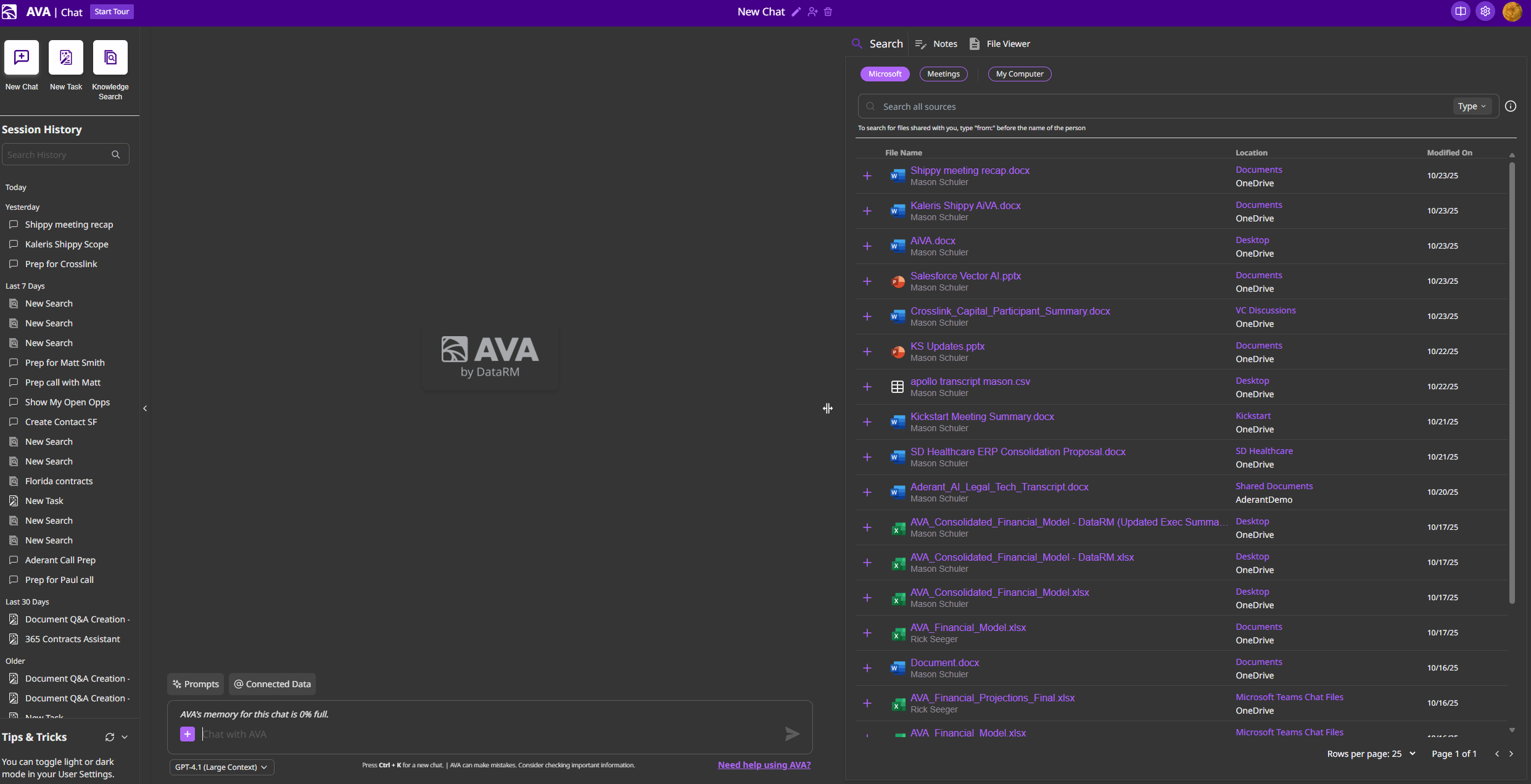 Access all your past conversations, tasks, and knowledge searches organized by recency
Central interaction space where you converse with AVA and use @ mentions to pull data from connected sources
Tabbed interface for Search, Notes, and File Viewer—similar to artifacts in other AI tools but integrated with your Microsoft 365 environment
### Connected Data Sources
Pull information from multiple systems using simple @ mentions:
Mail, Calendar, Files, OneDrive, Teams, To Do—all via @Microsoft 365 Apps
Real-time web searches with @Web for current information and research
Opportunities, Leads, Cases, Accounts, Contacts
Issues, Projects, Boards, Sprints
Repositories, Code, Pull Requests, Issues
Business records and transactions
Extend to any app with OAuth/SAML SSO in your Entra ID
**Beyond Standard Integrations**: AVA can connect to virtually any Enterprise Application already configured in your Microsoft Entra ID with OAuth or SAML. Your existing SSO infrastructure becomes AVA's integration platform. [Learn more →](/integrations/overview#beyond-standard-integrations)
### Powerful Productivity Features
Generate Word documents, PowerPoint presentations, and Excel spreadsheets directly from your conversations or notes
Access and summarize recorded Microsoft Teams meetings, add them to conversations for context
Create, save, and share custom prompts with your team. Filter by connected data sources and file types
Choose from multiple AI models across Azure OpenAI, AWS Bedrock, and Google Vertex AI
## Explore the Documentation
Find the information you need—whether you're an end user, administrator, or decision maker.
Enterprise security, seamless integration, and proven results
Learn how to use AVA Chat, Tasks, and Knowledge Search effectively
Deploy and manage AVA in your Azure tenant
Connect Microsoft 365, Salesforce, Jira, GitHub, and more
Rollout strategies and training resources for your organization
Videos, templates, and learning materials
## Quick Links
Coming soon! Step-by-step video guides
Ready-to-use prompts by role and use case
Productivity shortcuts for power users
Common issues and solutions
## Get Started
Authenticate with your Microsoft work account
Try [AVA Chat](/features/ava-chat), [Tasks](/features/ava-tasks), and [Knowledge Search](/features/knowledge-search)
Use @ mentions to access your [connected data sources](/integrations/microsoft-365)
Build custom prompts in the [Prompt Library](/guides/prompt-library) and share with your team
## Popular Features
Pull data from any connected source with simple @ syntax
Create corpora from your SharePoint sites for intelligent document search
Master the Notes, Search, and File Viewer capabilities
Generate PowerPoint, Word, and Excel files from your work
## Need Help?
Email us at [avasupport@datarm.ai](mailto:avasupport@datarm.ai) - we typically respond within 4 business hours
For new customers and product demonstrations
Access all your past conversations, tasks, and knowledge searches organized by recency
Central interaction space where you converse with AVA and use @ mentions to pull data from connected sources
Tabbed interface for Search, Notes, and File Viewer—similar to artifacts in other AI tools but integrated with your Microsoft 365 environment
### Connected Data Sources
Pull information from multiple systems using simple @ mentions:
Mail, Calendar, Files, OneDrive, Teams, To Do—all via @Microsoft 365 Apps
Real-time web searches with @Web for current information and research
Opportunities, Leads, Cases, Accounts, Contacts
Issues, Projects, Boards, Sprints
Repositories, Code, Pull Requests, Issues
Business records and transactions
Extend to any app with OAuth/SAML SSO in your Entra ID
**Beyond Standard Integrations**: AVA can connect to virtually any Enterprise Application already configured in your Microsoft Entra ID with OAuth or SAML. Your existing SSO infrastructure becomes AVA's integration platform. [Learn more →](/integrations/overview#beyond-standard-integrations)
### Powerful Productivity Features
Generate Word documents, PowerPoint presentations, and Excel spreadsheets directly from your conversations or notes
Access and summarize recorded Microsoft Teams meetings, add them to conversations for context
Create, save, and share custom prompts with your team. Filter by connected data sources and file types
Choose from multiple AI models across Azure OpenAI, AWS Bedrock, and Google Vertex AI
## Explore the Documentation
Find the information you need—whether you're an end user, administrator, or decision maker.
Enterprise security, seamless integration, and proven results
Learn how to use AVA Chat, Tasks, and Knowledge Search effectively
Deploy and manage AVA in your Azure tenant
Connect Microsoft 365, Salesforce, Jira, GitHub, and more
Rollout strategies and training resources for your organization
Videos, templates, and learning materials
## Quick Links
Coming soon! Step-by-step video guides
Ready-to-use prompts by role and use case
Productivity shortcuts for power users
Common issues and solutions
## Get Started
Authenticate with your Microsoft work account
Try [AVA Chat](/features/ava-chat), [Tasks](/features/ava-tasks), and [Knowledge Search](/features/knowledge-search)
Use @ mentions to access your [connected data sources](/integrations/microsoft-365)
Build custom prompts in the [Prompt Library](/guides/prompt-library) and share with your team
## Popular Features
Pull data from any connected source with simple @ syntax
Create corpora from your SharePoint sites for intelligent document search
Master the Notes, Search, and File Viewer capabilities
Generate PowerPoint, Word, and Excel files from your work
## Need Help?
Email us at [avasupport@datarm.ai](mailto:avasupport@datarm.ai) - we typically respond within 4 business hours
For new customers and product demonstrations