> ## Documentation Index
> Fetch the complete documentation index at: https://docs.datarm.ai/llms.txt
> Use this file to discover all available pages before exploring further.
# How AVA Works
> Understanding AVA architecture, identity flow, and technical implementation
## Architecture Overview
AVA is deployed as a private, single-tenant application within your Azure environment. This architecture ensures your data never leaves your tenant while providing enterprise-grade AI capabilities through a secure, identity-based access model.
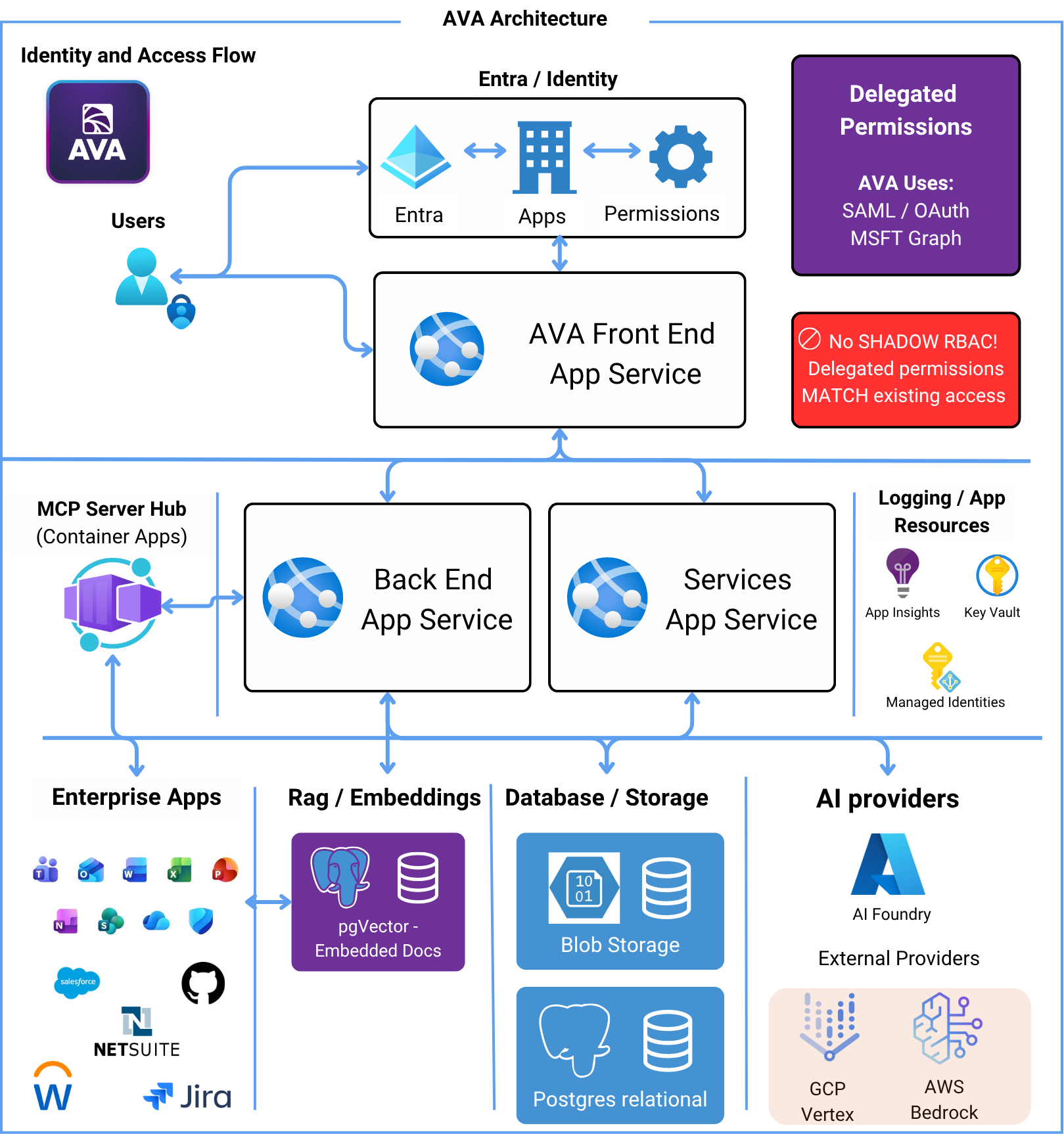 ## Identity and Access Flow
The foundation of AVA's security model is **delegated permissions** through Microsoft Entra ID:
Users sign in to AVA using their Microsoft work account (same credentials used for Office 365)
Microsoft Entra ID authenticates the user and establishes their identity and permissions
AVA operates with the user's permissions—it can only access what the authenticated user can access
**Critical**: AVA doesn't maintain separate permission systems. Delegated permissions MATCH existing access controls
**No Elevated Access**: AVA never has broader permissions than the user. If you can't access a file in SharePoint, neither can AVA on your behalf.
## System Architecture
### Frontend Layer
**AVA Front End App Service** (Azure App Service)
* React-based web application
* Handles user interface and interactions
* Communicates with backend via secure APIs
* Session management and state
### Backend Layer
Two primary backend services running as Azure Container Apps:
**Core orchestration and AI integration**
* Chat conversation management
* Task workflow execution
* Model Context Protocol (MCP) orchestration
* AI provider integration (AI Foundry, AWS Bedrock, GCP Vertex)
* User context and session handling
**Knowledge Search and RAG capabilities**
* Document embedding generation
* Vector similarity search
* Corpus management
* SharePoint synchronization
* Search result ranking and retrieval
### MCP Server Hub
**Container Apps running MCP servers**
Model Context Protocol (MCP) servers act as standardized connectors to enterprise applications:
* Outlook (Mail & Calendar)
* OneDrive (Files)
* SharePoint (Sites)
* Teams (Meetings & Messages)
* Read and write CRM data
* Query opportunities, leads, cases
* Update records
* Issue management
* Project queries
* Status updates
* Repository access
* Code search
* Pull request queries
**Additional MCP Servers:**
* NetSuite integration
* Microsoft Security (Defender)
* Web Scraping & Crawling
* Custom MCP servers (extensible)
### Extend AVA to Any Enterprise Application
**Leverage Your Existing SSO Infrastructure**: AVA can integrate with virtually any application already configured as an Enterprise Application in your Microsoft Entra ID—if it uses OAuth or SAML for authentication.
**How It Works:**
Your organization has likely already configured single sign-on (SSO) for dozens of enterprise applications in Microsoft Entra ID. AVA can leverage these existing OAuth/SAML configurations to create new MCP integrations without additional authentication setup.
**The Power of MCP Extensibility:**
1. **Use What You Already Have**: Enterprise apps already in your Entra ID tenant can become AVA data sources
2. **OAuth/SAML Ready**: If your app supports OAuth or SAML (most modern SaaS apps do), it can connect to AVA
3. **No Duplicate Auth**: Leverages the SSO configuration you've already completed
4. **Delegated Permissions**: Same identity-based security model as all AVA integrations
**Examples of What's Possible:**
* **HR Systems**: Workday, BambooHR, ADP - access employee data, org charts, PTO balances
* **Project Management**: Monday.com, Asana, ClickUp - query tasks, projects, timelines
* **Customer Support**: Zendesk, Freshdesk, Intercom - access tickets, customer conversations
* **Marketing Platforms**: HubSpot, Marketo, Mailchimp - campaign data, analytics, contacts
* **Finance Systems**: QuickBooks, Xero, Bill.com - financial data, invoices, reports
* **Custom Internal Tools**: Any internal app with OAuth/SAML SSO configured in Entra ID
**Requirements:**
✅ Application registered as Enterprise Application in your Entra ID
✅ OAuth 2.0 or SAML 2.0 authentication configured
✅ SSO working for your users
✅ API access available (most modern apps provide REST APIs)
**The possibilities expand with your enterprise ecosystem**: As you add new Enterprise Applications to Entra ID, AVA's potential integrations grow—creating a truly unified AI assistant across your entire technology stack.
### Data Layer
**Relational data storage**
* User context and sessions
* Chat conversation history
* Task definitions and state
* Prompt library
* Activity logs
* Corpus metadata
**Vector storage for RAG**
* Document embeddings for Knowledge Search
* Semantic search capabilities
* Fast similarity matching
* Embedded alongside relational data
**File and binary storage**
* Uploaded documents
* Temporary file storage
* Export artifacts (PowerPoint, Word, Excel)
### AI Providers
AVA supports multiple AI providers for model flexibility:
**Primary provider**
* GPT-4, GPT-4 Turbo
* GPT-3.5 Turbo
* o1, o3-mini models
* Embeddings (text-embedding-ada-002)
**Alternative provider**
* Claude Sonnet
* Claude Opus
* Other Bedrock models
**Alternative provider**
* Gemini Pro
* PaLM models
Users can select different models based on:
* Task complexity
* Response speed requirements
* Cost considerations
* Context window size needs
### Supporting Azure Resources
Application monitoring, telemetry, and performance tracking
Secure storage for secrets, API keys, and connection strings
Passwordless authentication between Azure services
## How a Conversation Works
Let's trace a typical user interaction:
User types a message in AVA Chat: "@Salesforce show me my open opportunities"
Front End App Service sends request to Back End App Service with user context
Backend validates user identity via Entra ID and retrieves delegated access token
Backend identifies @Salesforce mention and routes request to Salesforce MCP server
Salesforce MCP server:
* Uses delegated user token
* Queries Salesforce with user's permissions
* Returns only data user can access
Backend sends user question + Salesforce data to selected AI provider (e.g., GPT-4 via Azure AI Foundry)
AI model generates response based on retrieved data and user context
Response flows back through backend → frontend → user's browser
## How Knowledge Search Works
Knowledge Search uses Retrieval Augmented Generation (RAG):
User creates a corpus pointing to a SharePoint site/document library
Services App Service:
* Connects to SharePoint using user's delegated permissions
* Downloads documents user can access
* Chunks documents into manageable segments
* Each chunk is sent to embedding model (e.g., text-embedding-ada-002)
* Vector embeddings are generated
* Embeddings stored in PostgreSQL with pgVector
If enabled, AVA periodically checks SharePoint for:
* New documents
* Modified documents
* Deleted documents
Updates embeddings accordingly
When user searches:
* Query is converted to vector embedding
* pgVector performs similarity search
* Top matching chunks are retrieved
* Retrieved chunks are sent to AI model as context
* Model generates response based on actual document content
* Cites source documents in response
## How Tasks Work
Multi-step task execution:
User creates task with multiple steps, each with its own instructions
User can add documents from workspace (OneDrive, SharePoint, or local files)
Backend processes each step sequentially:
* Evaluates step instructions
* Includes previous step results as context
* Can use @ mentions to pull live data
* SuperPrompt (if enabled) enhances AI guidance
Task state stored in PostgreSQL:
* Current step
* Step results
* Overall progress
Successful tasks can be saved as templates for reuse
## Security Architecture
### Authentication & Authorization
```
User → Entra ID (SAML/OAuth) → AVA Front End
↓
Delegated Access Token
↓
Back End App Service
↓
Uses User's Token for All MCP Calls
↓
Enterprise Apps (M365, Salesforce, etc.)
```
**Key Principles:**
* ✅ **Delegated Permissions**: AVA uses SAML/OAuth to obtain delegated access
* ✅ **User-Scoped Access**: Every API call uses the authenticated user's token
* ✅ **No Privilege Escalation**: AVA cannot access data the user cannot access
* ✅ **Audit Trail**: All actions logged with user identity
### Data Security
* All data stays within your Azure tenant
* Processing happens in your tenant's region
* No external SaaS data transfer
* You control data location and retention
* **In Transit**: TLS 1.3 for all communications
* **At Rest**: Azure-managed encryption for database and blob storage
* **Secrets**: Stored in Azure Key Vault
* Container Apps in isolated virtual network
* Managed identities for service-to-service auth
* No hard-coded credentials
* Azure Private Link support (optional)
## Deployment Model
AVA is deployed as a **single-tenant, private deployment** for each customer:
* Deployed entirely within your subscription
* You control all Azure resources
* No shared infrastructure
* Complete data isolation
* Registered in your Entra ID
* Uses your identity provider
* Integrates with your policies
* Respects your conditional access
**This means:**
* ✅ Data sovereignty: Your data, your tenant, your control
* ✅ Compliance-friendly: Easier to meet regulatory requirements
* ✅ Customizable: Can be tailored to your environment
* ✅ Secure: No multi-tenant security risks
## Scalability & Performance
AVA is built to scale:
* **Azure Container Apps**: Auto-scales based on demand
* **PostgreSQL Flexible Server**: Can scale vertically and add read replicas
* **Blob Storage**: Virtually unlimited storage capacity
* **AI Providers**: Load balanced across regions
**Performance Characteristics:**
* Chat responses: 2-10 seconds (depending on model and complexity)
* Knowledge Search: Sub-second vector search, 3-8 seconds total with AI generation
* Task execution: Varies by steps and data sources
* Concurrent users: Scales automatically with container app scaling
## Monitoring & Observability
* Request/response telemetry
* Performance metrics
* Dependency tracking
* Custom events and metrics
* Failure analysis
* Structured application logs
* User activity tracking
* MCP server call logs
* AI provider interaction logs
* Export to Log Analytics
* Service health monitoring
* Performance degradation alerts
* Error rate thresholds
* Custom metric alerts
## Technical Stack Summary
| Layer | Technology |
| ---------------- | ----------------------------------------- |
| **Frontend** | React, TypeScript, Azure App Service |
| **Backend** | Python, FastAPI, Azure Container Apps |
| **Database** | PostgreSQL Flexible Server with pgVector |
| **Storage** | Azure Blob Storage |
| **Identity** | Microsoft Entra ID (SAML/OAuth) |
| **Secrets** | Azure Key Vault |
| **Monitoring** | Application Insights, Log Analytics |
| **AI Models** | Azure AI Foundry, AWS Bedrock, GCP Vertex |
| **Integrations** | Model Context Protocol (MCP) |
| **Embedding** | text-embedding-ada-002, pgvector |
## Next Steps
Explore what you can do with AVA
Learn how to deploy AVA
Start using AVA today
## Identity and Access Flow
The foundation of AVA's security model is **delegated permissions** through Microsoft Entra ID:
Users sign in to AVA using their Microsoft work account (same credentials used for Office 365)
Microsoft Entra ID authenticates the user and establishes their identity and permissions
AVA operates with the user's permissions—it can only access what the authenticated user can access
**Critical**: AVA doesn't maintain separate permission systems. Delegated permissions MATCH existing access controls
**No Elevated Access**: AVA never has broader permissions than the user. If you can't access a file in SharePoint, neither can AVA on your behalf.
## System Architecture
### Frontend Layer
**AVA Front End App Service** (Azure App Service)
* React-based web application
* Handles user interface and interactions
* Communicates with backend via secure APIs
* Session management and state
### Backend Layer
Two primary backend services running as Azure Container Apps:
**Core orchestration and AI integration**
* Chat conversation management
* Task workflow execution
* Model Context Protocol (MCP) orchestration
* AI provider integration (AI Foundry, AWS Bedrock, GCP Vertex)
* User context and session handling
**Knowledge Search and RAG capabilities**
* Document embedding generation
* Vector similarity search
* Corpus management
* SharePoint synchronization
* Search result ranking and retrieval
### MCP Server Hub
**Container Apps running MCP servers**
Model Context Protocol (MCP) servers act as standardized connectors to enterprise applications:
* Outlook (Mail & Calendar)
* OneDrive (Files)
* SharePoint (Sites)
* Teams (Meetings & Messages)
* Read and write CRM data
* Query opportunities, leads, cases
* Update records
* Issue management
* Project queries
* Status updates
* Repository access
* Code search
* Pull request queries
**Additional MCP Servers:**
* NetSuite integration
* Microsoft Security (Defender)
* Web Scraping & Crawling
* Custom MCP servers (extensible)
### Extend AVA to Any Enterprise Application
**Leverage Your Existing SSO Infrastructure**: AVA can integrate with virtually any application already configured as an Enterprise Application in your Microsoft Entra ID—if it uses OAuth or SAML for authentication.
**How It Works:**
Your organization has likely already configured single sign-on (SSO) for dozens of enterprise applications in Microsoft Entra ID. AVA can leverage these existing OAuth/SAML configurations to create new MCP integrations without additional authentication setup.
**The Power of MCP Extensibility:**
1. **Use What You Already Have**: Enterprise apps already in your Entra ID tenant can become AVA data sources
2. **OAuth/SAML Ready**: If your app supports OAuth or SAML (most modern SaaS apps do), it can connect to AVA
3. **No Duplicate Auth**: Leverages the SSO configuration you've already completed
4. **Delegated Permissions**: Same identity-based security model as all AVA integrations
**Examples of What's Possible:**
* **HR Systems**: Workday, BambooHR, ADP - access employee data, org charts, PTO balances
* **Project Management**: Monday.com, Asana, ClickUp - query tasks, projects, timelines
* **Customer Support**: Zendesk, Freshdesk, Intercom - access tickets, customer conversations
* **Marketing Platforms**: HubSpot, Marketo, Mailchimp - campaign data, analytics, contacts
* **Finance Systems**: QuickBooks, Xero, Bill.com - financial data, invoices, reports
* **Custom Internal Tools**: Any internal app with OAuth/SAML SSO configured in Entra ID
**Requirements:**
✅ Application registered as Enterprise Application in your Entra ID
✅ OAuth 2.0 or SAML 2.0 authentication configured
✅ SSO working for your users
✅ API access available (most modern apps provide REST APIs)
**The possibilities expand with your enterprise ecosystem**: As you add new Enterprise Applications to Entra ID, AVA's potential integrations grow—creating a truly unified AI assistant across your entire technology stack.
### Data Layer
**Relational data storage**
* User context and sessions
* Chat conversation history
* Task definitions and state
* Prompt library
* Activity logs
* Corpus metadata
**Vector storage for RAG**
* Document embeddings for Knowledge Search
* Semantic search capabilities
* Fast similarity matching
* Embedded alongside relational data
**File and binary storage**
* Uploaded documents
* Temporary file storage
* Export artifacts (PowerPoint, Word, Excel)
### AI Providers
AVA supports multiple AI providers for model flexibility:
**Primary provider**
* GPT-4, GPT-4 Turbo
* GPT-3.5 Turbo
* o1, o3-mini models
* Embeddings (text-embedding-ada-002)
**Alternative provider**
* Claude Sonnet
* Claude Opus
* Other Bedrock models
**Alternative provider**
* Gemini Pro
* PaLM models
Users can select different models based on:
* Task complexity
* Response speed requirements
* Cost considerations
* Context window size needs
### Supporting Azure Resources
Application monitoring, telemetry, and performance tracking
Secure storage for secrets, API keys, and connection strings
Passwordless authentication between Azure services
## How a Conversation Works
Let's trace a typical user interaction:
User types a message in AVA Chat: "@Salesforce show me my open opportunities"
Front End App Service sends request to Back End App Service with user context
Backend validates user identity via Entra ID and retrieves delegated access token
Backend identifies @Salesforce mention and routes request to Salesforce MCP server
Salesforce MCP server:
* Uses delegated user token
* Queries Salesforce with user's permissions
* Returns only data user can access
Backend sends user question + Salesforce data to selected AI provider (e.g., GPT-4 via Azure AI Foundry)
AI model generates response based on retrieved data and user context
Response flows back through backend → frontend → user's browser
## How Knowledge Search Works
Knowledge Search uses Retrieval Augmented Generation (RAG):
User creates a corpus pointing to a SharePoint site/document library
Services App Service:
* Connects to SharePoint using user's delegated permissions
* Downloads documents user can access
* Chunks documents into manageable segments
* Each chunk is sent to embedding model (e.g., text-embedding-ada-002)
* Vector embeddings are generated
* Embeddings stored in PostgreSQL with pgVector
If enabled, AVA periodically checks SharePoint for:
* New documents
* Modified documents
* Deleted documents
Updates embeddings accordingly
When user searches:
* Query is converted to vector embedding
* pgVector performs similarity search
* Top matching chunks are retrieved
* Retrieved chunks are sent to AI model as context
* Model generates response based on actual document content
* Cites source documents in response
## How Tasks Work
Multi-step task execution:
User creates task with multiple steps, each with its own instructions
User can add documents from workspace (OneDrive, SharePoint, or local files)
Backend processes each step sequentially:
* Evaluates step instructions
* Includes previous step results as context
* Can use @ mentions to pull live data
* SuperPrompt (if enabled) enhances AI guidance
Task state stored in PostgreSQL:
* Current step
* Step results
* Overall progress
Successful tasks can be saved as templates for reuse
## Security Architecture
### Authentication & Authorization
```
User → Entra ID (SAML/OAuth) → AVA Front End
↓
Delegated Access Token
↓
Back End App Service
↓
Uses User's Token for All MCP Calls
↓
Enterprise Apps (M365, Salesforce, etc.)
```
**Key Principles:**
* ✅ **Delegated Permissions**: AVA uses SAML/OAuth to obtain delegated access
* ✅ **User-Scoped Access**: Every API call uses the authenticated user's token
* ✅ **No Privilege Escalation**: AVA cannot access data the user cannot access
* ✅ **Audit Trail**: All actions logged with user identity
### Data Security
* All data stays within your Azure tenant
* Processing happens in your tenant's region
* No external SaaS data transfer
* You control data location and retention
* **In Transit**: TLS 1.3 for all communications
* **At Rest**: Azure-managed encryption for database and blob storage
* **Secrets**: Stored in Azure Key Vault
* Container Apps in isolated virtual network
* Managed identities for service-to-service auth
* No hard-coded credentials
* Azure Private Link support (optional)
## Deployment Model
AVA is deployed as a **single-tenant, private deployment** for each customer:
* Deployed entirely within your subscription
* You control all Azure resources
* No shared infrastructure
* Complete data isolation
* Registered in your Entra ID
* Uses your identity provider
* Integrates with your policies
* Respects your conditional access
**This means:**
* ✅ Data sovereignty: Your data, your tenant, your control
* ✅ Compliance-friendly: Easier to meet regulatory requirements
* ✅ Customizable: Can be tailored to your environment
* ✅ Secure: No multi-tenant security risks
## Scalability & Performance
AVA is built to scale:
* **Azure Container Apps**: Auto-scales based on demand
* **PostgreSQL Flexible Server**: Can scale vertically and add read replicas
* **Blob Storage**: Virtually unlimited storage capacity
* **AI Providers**: Load balanced across regions
**Performance Characteristics:**
* Chat responses: 2-10 seconds (depending on model and complexity)
* Knowledge Search: Sub-second vector search, 3-8 seconds total with AI generation
* Task execution: Varies by steps and data sources
* Concurrent users: Scales automatically with container app scaling
## Monitoring & Observability
* Request/response telemetry
* Performance metrics
* Dependency tracking
* Custom events and metrics
* Failure analysis
* Structured application logs
* User activity tracking
* MCP server call logs
* AI provider interaction logs
* Export to Log Analytics
* Service health monitoring
* Performance degradation alerts
* Error rate thresholds
* Custom metric alerts
## Technical Stack Summary
| Layer | Technology |
| ---------------- | ----------------------------------------- |
| **Frontend** | React, TypeScript, Azure App Service |
| **Backend** | Python, FastAPI, Azure Container Apps |
| **Database** | PostgreSQL Flexible Server with pgVector |
| **Storage** | Azure Blob Storage |
| **Identity** | Microsoft Entra ID (SAML/OAuth) |
| **Secrets** | Azure Key Vault |
| **Monitoring** | Application Insights, Log Analytics |
| **AI Models** | Azure AI Foundry, AWS Bedrock, GCP Vertex |
| **Integrations** | Model Context Protocol (MCP) |
| **Embedding** | text-embedding-ada-002, pgvector |
## Next Steps
Explore what you can do with AVA
Learn how to deploy AVA
Start using AVA today