> ## Documentation Index
> Fetch the complete documentation index at: https://docs.datarm.ai/llms.txt
> Use this file to discover all available pages before exploring further.
# Azure Deployment Architecture
> Understanding AVA deployment in your Azure tenant
## Overview
AVA is deployed exclusively as a **single-tenant application within your Azure tenant**. Unlike traditional SaaS offerings, AVA runs entirely in your Azure environment, giving you complete control over data residency, security, and compliance.
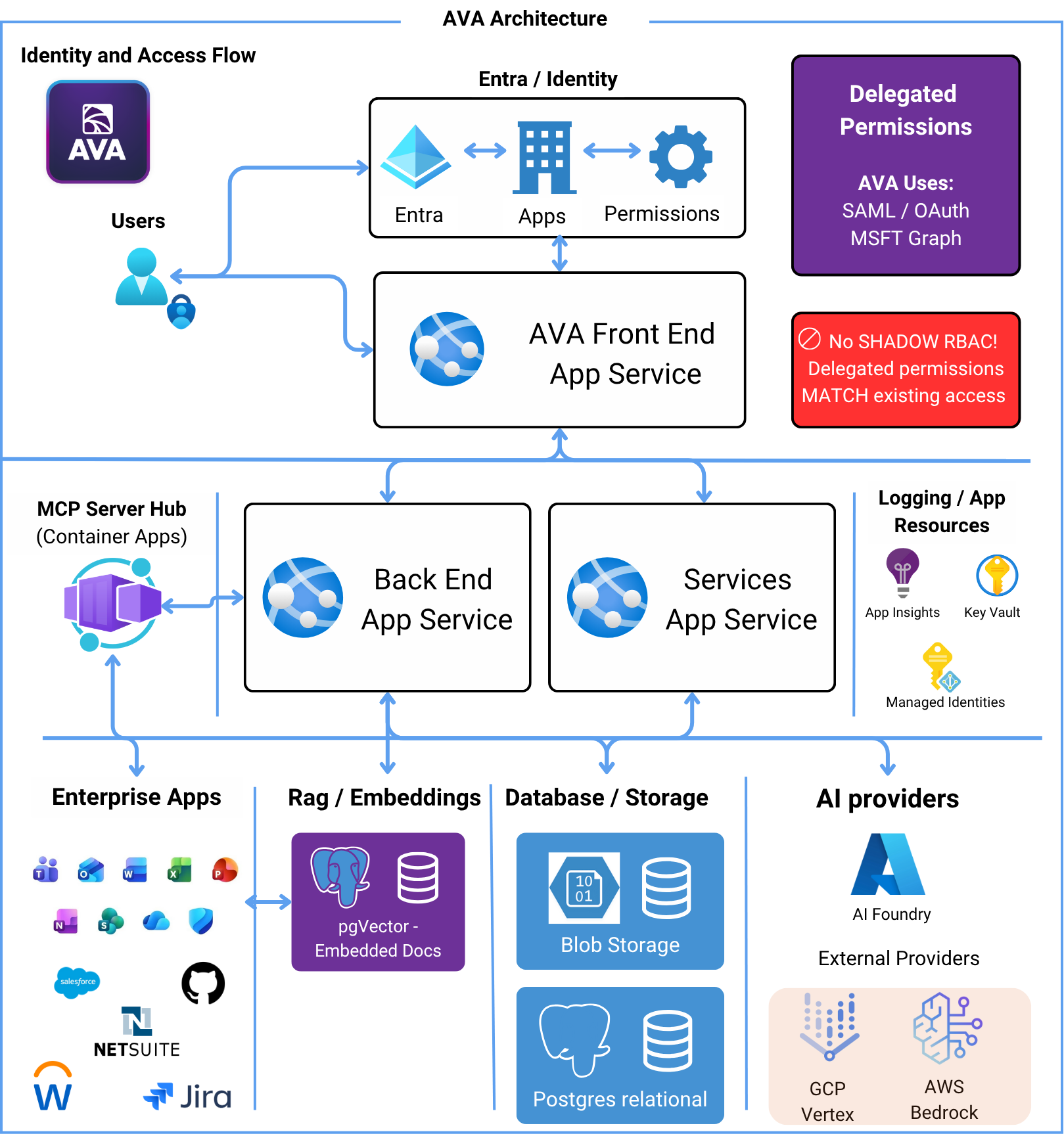 **Single-Tenant Only**: AVA is never deployed as a multi-tenant SaaS. Each customer gets their own isolated deployment in their Azure tenant.
## Core Azure Components
AVA leverages managed Azure services to provide a secure, scalable, and maintainable enterprise AI platform:
Frontend React application hosting
Backend Python services and MCP servers
Primary data store with pgVector for embeddings
Secrets management and configuration
AI model deployment and orchestration
Identity, authentication, and authorization
## Architecture Layers
### 1. Identity & Access Layer
**Microsoft Entra ID** provides the foundation for security:
* **Enterprise App**: Registered in your Entra ID for SSO
* **App Registration**: Defines API permissions and scopes
* **Managed Identity**: Backend services use managed identity to access Key Vault
* **Delegated Permissions**: AVA operates with user permissions (no elevated access)
**Single-Tenant Only**: AVA is never deployed as a multi-tenant SaaS. Each customer gets their own isolated deployment in their Azure tenant.
## Core Azure Components
AVA leverages managed Azure services to provide a secure, scalable, and maintainable enterprise AI platform:
Frontend React application hosting
Backend Python services and MCP servers
Primary data store with pgVector for embeddings
Secrets management and configuration
AI model deployment and orchestration
Identity, authentication, and authorization
## Architecture Layers
### 1. Identity & Access Layer
**Microsoft Entra ID** provides the foundation for security:
* **Enterprise App**: Registered in your Entra ID for SSO
* **App Registration**: Defines API permissions and scopes
* **Managed Identity**: Backend services use managed identity to access Key Vault
* **Delegated Permissions**: AVA operates with user permissions (no elevated access)
 ### 2. Frontend Layer
**Azure App Service** hosts the React-based web application:
* Static web hosting with CDN integration
* TLS/SSL termination
* Custom domain support (e.g., `ava.yourcompany.com`)
* Automatic scaling based on user load
### 2. Frontend Layer
**Azure App Service** hosts the React-based web application:
* Static web hosting with CDN integration
* TLS/SSL termination
* Custom domain support (e.g., `ava.yourcompany.com`)
* Automatic scaling based on user load
 ### 3. Backend Services Layer
**Azure Container Apps** runs the Python-based backend services:
* RESTful API for frontend communication
* Business logic orchestration
* AI model interaction
* Task execution engine
* Knowledge Search processing
**Key features**:
* Auto-scaling based on CPU/memory/request metrics
* Zero-downtime deployments
* Built-in load balancing
* Integrated with Azure Monitor for observability
### 3. Backend Services Layer
**Azure Container Apps** runs the Python-based backend services:
* RESTful API for frontend communication
* Business logic orchestration
* AI model interaction
* Task execution engine
* Knowledge Search processing
**Key features**:
* Auto-scaling based on CPU/memory/request metrics
* Zero-downtime deployments
* Built-in load balancing
* Integrated with Azure Monitor for observability
 ### 4. MCP Server Layer
**Model Context Protocol (MCP) servers** run as dedicated Container Apps:
Each integration (Microsoft 365, Salesforce, Jira, GitHub, NetSuite, etc.) is deployed as a separate container app that:
* Uses your existing SSO configuration per application
* Operates with delegated user permissions
* Scales independently based on usage
* Communicates securely with backend services
### 4. MCP Server Layer
**Model Context Protocol (MCP) servers** run as dedicated Container Apps:
Each integration (Microsoft 365, Salesforce, Jira, GitHub, NetSuite, etc.) is deployed as a separate container app that:
* Uses your existing SSO configuration per application
* Operates with delegated user permissions
* Scales independently based on usage
* Communicates securely with backend services
 **Example MCP Servers**:
* `mcp-microsoft365`: Calendar, Mail, Files, Teams integration
* `mcp-salesforce`: CRM data access
* `mcp-jira`: Project management
* `mcp-github`: Repository and code access
* `mcp-netsuite`: Business records
### 5. Data Layer
**Azure PostgreSQL Flexible Server** with pgVector extension:
* Primary application database
* Vector embeddings storage for Knowledge Search (RAG)
* High availability with zone redundancy
* Automated backups with point-in-time restore
* Private endpoint for network isolation
**Example MCP Servers**:
* `mcp-microsoft365`: Calendar, Mail, Files, Teams integration
* `mcp-salesforce`: CRM data access
* `mcp-jira`: Project management
* `mcp-github`: Repository and code access
* `mcp-netsuite`: Business records
### 5. Data Layer
**Azure PostgreSQL Flexible Server** with pgVector extension:
* Primary application database
* Vector embeddings storage for Knowledge Search (RAG)
* High availability with zone redundancy
* Automated backups with point-in-time restore
* Private endpoint for network isolation
 ### 6. AI Provider Layer
**Azure AI Foundry** (and optional AWS Bedrock, GCP Vertex):
* Model deployment and hosting
* Token usage tracking
* Content filtering
* Multi-model support (GPT-5 series, GPT-image-1, Claude 4 series, Gemini 2.5, etc.)
* Cost optimization through model selection
### 6. AI Provider Layer
**Azure AI Foundry** (and optional AWS Bedrock, GCP Vertex):
* Model deployment and hosting
* Token usage tracking
* Content filtering
* Multi-model support (GPT-5 series, GPT-image-1, Claude 4 series, Gemini 2.5, etc.)
* Cost optimization through model selection
 ## Security Architecture
### Managed Identity Pattern
AVA backend services use **Azure Managed Identity** to access resources:
```
Backend Container Apps → Managed Identity → Azure Key Vault → Secrets
↓
Azure PostgreSQL (via managed identity)
↓
Azure AI Foundry (via managed identity)
```
**Benefits**:
* No credentials stored in code or configuration
* Automatic credential rotation
* Azure AD authentication for all services
* Audit trail through Azure Monitor
### Network Security
* **Private Endpoints**: Database and Key Vault accessible only within VNet
* **No Public Internet Exposure**: Backend services communicate via internal networking
* **TLS Everywhere**: All communication encrypted in transit
* **Azure DDoS Protection**: Standard protection for public-facing services
### Data Protection
* **Encryption at Rest**: Azure Storage/Database encryption enabled by default
* **Encryption in Transit**: TLS 1.3 for all communications
* **Key Management**: All keys stored in Azure Key Vault with FIPS 140-2 compliance
* **Data Residency**: Data never leaves your Azure tenant
## Security Architecture
### Managed Identity Pattern
AVA backend services use **Azure Managed Identity** to access resources:
```
Backend Container Apps → Managed Identity → Azure Key Vault → Secrets
↓
Azure PostgreSQL (via managed identity)
↓
Azure AI Foundry (via managed identity)
```
**Benefits**:
* No credentials stored in code or configuration
* Automatic credential rotation
* Azure AD authentication for all services
* Audit trail through Azure Monitor
### Network Security
* **Private Endpoints**: Database and Key Vault accessible only within VNet
* **No Public Internet Exposure**: Backend services communicate via internal networking
* **TLS Everywhere**: All communication encrypted in transit
* **Azure DDoS Protection**: Standard protection for public-facing services
### Data Protection
* **Encryption at Rest**: Azure Storage/Database encryption enabled by default
* **Encryption in Transit**: TLS 1.3 for all communications
* **Key Management**: All keys stored in Azure Key Vault with FIPS 140-2 compliance
* **Data Residency**: Data never leaves your Azure tenant
 ## Deployment Sizing
AVA deployment is **right-sized to your organization** based on:
* Number of users
* Expected usage patterns
* Connected data sources
* Knowledge Search corpus size
* Performance requirements
### Small Deployment (\< 100 users)
* **App Service**: P1V3 (2 vCPU, 8 GB RAM)
* **Container Apps**:
* Backend: 1-2 replicas, 0.5 vCPU, 1 GB RAM each
* MCP servers: 1 replica each, 0.25 vCPU, 0.5 GB RAM
* **PostgreSQL**: B\_Standard\_B1ms (1 vCPU, 2 GB RAM, 32 GB storage)
### Medium Deployment (100-500 users)
* **App Service**: P1V3 (2 vCPU, 8 GB RAM)
* **Container Apps**:
* Backend: 2-4 replicas, 0.5 vCPU, 1 GB RAM each
* MCP servers: 1-2 replicas each, 0.5 vCPU, 1 GB RAM
* **PostgreSQL**: B\_Standard\_B2s (2 vCPU, 4 GB RAM, 64 GB storage)
### Large Deployment (500+ users)
* **App Service**: P2V3 (4 vCPU, 16 GB RAM) with autoscale
* **Container Apps**:
* Backend: 4-8 replicas, 1 vCPU, 2 GB RAM each
* MCP servers: 2-3 replicas each, 0.5 vCPU, 1 GB RAM
* **PostgreSQL**: GP\_Standard\_D2s\_v3 (2 vCPU, 8 GB RAM, 128 GB storage)
**Performance Tuning**: All deployment sizes can be scaled up or down based on actual usage patterns and performance requirements.
## Scaling Strategy
### Horizontal Scaling
AVA automatically scales based on metrics:
* **Frontend (App Service)**: CPU and memory-based autoscale rules
* **Backend (Container Apps)**: Request count, CPU, memory triggers
* **MCP Servers**: Independent scaling per integration based on usage
### Performance Optimization
As usage grows, AVA can be optimized by:
1. **Increasing Container App Replicas**: More concurrent request handling
2. **Scaling Database Tier**: Better query performance for large datasets
3. **Adding Read Replicas**: Offload read traffic from primary database
4. **Optimizing AI Model Selection**: Balance cost vs performance per use case
## Monitoring & Observability
All Azure resources integrate with **Azure Monitor**:
* Application Insights for frontend/backend telemetry
* Container Apps logs and metrics
* Database performance metrics
* Key Vault access logs
* Cost analysis and optimization recommendations
## Deployment Process
* Azure subscription with Owner or Contributor role
* Microsoft Entra ID admin access
* Custom domain (optional but recommended)
DataRM provisions all Azure resources in your tenant using Infrastructure as Code (Bicep and ARM templates):
* Resource Group creation
* App Service and Container Apps
* PostgreSQL database with pgVector
* Key Vault for secrets
* Managed identities and role assignments
Configure Microsoft Entra ID:
* Create Enterprise Application
* Register App Registration with API permissions
* Configure delegated permissions
* Assign users/groups
Deploy and configure MCP servers:
* Microsoft 365 (automatic for Entra users)
* Salesforce (requires Salesforce Connected App)
* Jira (requires Jira OAuth app)
* GitHub (requires GitHub App)
* Other integrations as needed
Connect to AI providers:
* Azure AI Foundry (primary)
* AWS Bedrock (optional)
* GCP Vertex (optional)
* Configure model access and quotas
* User authentication testing
* Data source connectivity verification
* Performance baseline testing
* Security configuration audit
* DNS configuration for custom domain
* User onboarding and training
* Monitoring and alerting setup
* Handoff to customer admin team
## Maintenance & Updates
### Automated Updates
AVA backend services (Container Apps) support **blue-green deployment**:
* New version deployed alongside existing version
* Traffic gradually shifted to new version
* Zero-downtime updates
* Automatic rollback on errors
### Database Migrations
* Schema changes applied via automated migration scripts
* Backward-compatible migrations ensure zero downtime
* Point-in-time restore available for rollback
### Security Patching
* Azure platform handles OS-level patching
* Container images rebuilt monthly with security updates
* Critical vulnerabilities patched within 48 hours
## Cost Optimization
### Estimated Monthly Cost
**AVA Pricing**: Monthly costs range from **$500 to $2,500** depending on your organization size and number of users. Pricing includes all Azure infrastructure, AI model usage, and platform features.
**Cost varies based on:**
* Number of active users
* AI model usage patterns
* Connected data sources
* Knowledge Search corpus size
* Performance requirements
**AI Token Costs**: The largest variable cost is AI model usage. Optimize by choosing appropriate models per task (e.g., GPT-5 Mini/Nano, Claude Haiku 4.5, or Gemini 2.5 Flash-Lite for simple tasks, GPT-5 Pro/Claude Opus 4.1 for complex reasoning).
### Optimization Strategies
1. **Auto-scaling**: Scale down during off-hours
2. **Reserved Instances**: 1-year commitment saves 30-40%
3. **Model Selection**: Use GPT-5 Mini/Nano, Flash, or Haiku models for routine tasks; reserve GPT-5 Pro/Opus for complex analysis
4. **Corpus Optimization**: Limit Knowledge Search corpora to essential documents
5. **Resource Right-Sizing**: Monitor and adjust compute resources based on actual usage
## Disaster Recovery
### Backup Strategy
* **Database**: Automated daily backups with 7-day retention (configurable to 35 days)
* **Point-in-Time Restore**: Restore to any point within retention window
* **Configuration Backup**: Key Vault secrets backed up to separate storage account
* **Code Repository**: Infrastructure as Code stored in source control
### High Availability
* **Zone Redundancy**: PostgreSQL and Container Apps deployed across availability zones
* **Automatic Failover**: Database failover in \< 2 minutes
* **Load Balancing**: Built-in load balancing for Container Apps
* **Health Checks**: Automatic unhealthy instance replacement
### Business Continuity
* **RTO (Recovery Time Objective)**: \< 4 hours
* **RPO (Recovery Point Objective)**: \< 15 minutes
* **Geo-Replication**: Optional for enterprise customers (additional cost)
## Compliance & Security
### Leverage Your Existing Azure Certifications
**Inherit Your Tenant's Compliance**: Because AVA runs entirely within your Azure tenant, you automatically inherit all existing Azure certifications and compliance frameworks your organization has already achieved.
**Key Benefits:**
* **No Separate Compliance Audit**: AVA lives within your already-certified Azure environment
* **Your Security Policies**: All existing Azure security policies, governance, and controls apply to AVA
* **Data Residency**: Data stays within your tenant's geographic boundaries and compliance zones
* **Existing Certifications**: Leverage your Azure tenant's SOC 2, ISO 27001, HIPAA, FedRAMP, GDPR, PCI DSS, and other certifications
**How It Works:**
1. **Single-Tenant Architecture**: AVA deploys as resources in your Azure subscription
2. **Azure's Shared Responsibility Model**: Infrastructure compliance handled by Azure, application security configured during deployment
3. **Your Governance**: AVA respects all Azure policies, RBAC, and compliance frameworks you've implemented
4. **Audit Trail**: All AVA activity logged through your existing Azure Monitor and Application Insights
**Simplified Compliance**: By running in your Azure tenant, AVA doesn't introduce new compliance challenges—it operates within your already-certified cloud environment.
## Next Steps
Detailed technical flow and MCP integration
Deep dive into security architecture
Request deployment for your organization
Learn how to use AVA after deployment
## Deployment Sizing
AVA deployment is **right-sized to your organization** based on:
* Number of users
* Expected usage patterns
* Connected data sources
* Knowledge Search corpus size
* Performance requirements
### Small Deployment (\< 100 users)
* **App Service**: P1V3 (2 vCPU, 8 GB RAM)
* **Container Apps**:
* Backend: 1-2 replicas, 0.5 vCPU, 1 GB RAM each
* MCP servers: 1 replica each, 0.25 vCPU, 0.5 GB RAM
* **PostgreSQL**: B\_Standard\_B1ms (1 vCPU, 2 GB RAM, 32 GB storage)
### Medium Deployment (100-500 users)
* **App Service**: P1V3 (2 vCPU, 8 GB RAM)
* **Container Apps**:
* Backend: 2-4 replicas, 0.5 vCPU, 1 GB RAM each
* MCP servers: 1-2 replicas each, 0.5 vCPU, 1 GB RAM
* **PostgreSQL**: B\_Standard\_B2s (2 vCPU, 4 GB RAM, 64 GB storage)
### Large Deployment (500+ users)
* **App Service**: P2V3 (4 vCPU, 16 GB RAM) with autoscale
* **Container Apps**:
* Backend: 4-8 replicas, 1 vCPU, 2 GB RAM each
* MCP servers: 2-3 replicas each, 0.5 vCPU, 1 GB RAM
* **PostgreSQL**: GP\_Standard\_D2s\_v3 (2 vCPU, 8 GB RAM, 128 GB storage)
**Performance Tuning**: All deployment sizes can be scaled up or down based on actual usage patterns and performance requirements.
## Scaling Strategy
### Horizontal Scaling
AVA automatically scales based on metrics:
* **Frontend (App Service)**: CPU and memory-based autoscale rules
* **Backend (Container Apps)**: Request count, CPU, memory triggers
* **MCP Servers**: Independent scaling per integration based on usage
### Performance Optimization
As usage grows, AVA can be optimized by:
1. **Increasing Container App Replicas**: More concurrent request handling
2. **Scaling Database Tier**: Better query performance for large datasets
3. **Adding Read Replicas**: Offload read traffic from primary database
4. **Optimizing AI Model Selection**: Balance cost vs performance per use case
## Monitoring & Observability
All Azure resources integrate with **Azure Monitor**:
* Application Insights for frontend/backend telemetry
* Container Apps logs and metrics
* Database performance metrics
* Key Vault access logs
* Cost analysis and optimization recommendations
## Deployment Process
* Azure subscription with Owner or Contributor role
* Microsoft Entra ID admin access
* Custom domain (optional but recommended)
DataRM provisions all Azure resources in your tenant using Infrastructure as Code (Bicep and ARM templates):
* Resource Group creation
* App Service and Container Apps
* PostgreSQL database with pgVector
* Key Vault for secrets
* Managed identities and role assignments
Configure Microsoft Entra ID:
* Create Enterprise Application
* Register App Registration with API permissions
* Configure delegated permissions
* Assign users/groups
Deploy and configure MCP servers:
* Microsoft 365 (automatic for Entra users)
* Salesforce (requires Salesforce Connected App)
* Jira (requires Jira OAuth app)
* GitHub (requires GitHub App)
* Other integrations as needed
Connect to AI providers:
* Azure AI Foundry (primary)
* AWS Bedrock (optional)
* GCP Vertex (optional)
* Configure model access and quotas
* User authentication testing
* Data source connectivity verification
* Performance baseline testing
* Security configuration audit
* DNS configuration for custom domain
* User onboarding and training
* Monitoring and alerting setup
* Handoff to customer admin team
## Maintenance & Updates
### Automated Updates
AVA backend services (Container Apps) support **blue-green deployment**:
* New version deployed alongside existing version
* Traffic gradually shifted to new version
* Zero-downtime updates
* Automatic rollback on errors
### Database Migrations
* Schema changes applied via automated migration scripts
* Backward-compatible migrations ensure zero downtime
* Point-in-time restore available for rollback
### Security Patching
* Azure platform handles OS-level patching
* Container images rebuilt monthly with security updates
* Critical vulnerabilities patched within 48 hours
## Cost Optimization
### Estimated Monthly Cost
**AVA Pricing**: Monthly costs range from **$500 to $2,500** depending on your organization size and number of users. Pricing includes all Azure infrastructure, AI model usage, and platform features.
**Cost varies based on:**
* Number of active users
* AI model usage patterns
* Connected data sources
* Knowledge Search corpus size
* Performance requirements
**AI Token Costs**: The largest variable cost is AI model usage. Optimize by choosing appropriate models per task (e.g., GPT-5 Mini/Nano, Claude Haiku 4.5, or Gemini 2.5 Flash-Lite for simple tasks, GPT-5 Pro/Claude Opus 4.1 for complex reasoning).
### Optimization Strategies
1. **Auto-scaling**: Scale down during off-hours
2. **Reserved Instances**: 1-year commitment saves 30-40%
3. **Model Selection**: Use GPT-5 Mini/Nano, Flash, or Haiku models for routine tasks; reserve GPT-5 Pro/Opus for complex analysis
4. **Corpus Optimization**: Limit Knowledge Search corpora to essential documents
5. **Resource Right-Sizing**: Monitor and adjust compute resources based on actual usage
## Disaster Recovery
### Backup Strategy
* **Database**: Automated daily backups with 7-day retention (configurable to 35 days)
* **Point-in-Time Restore**: Restore to any point within retention window
* **Configuration Backup**: Key Vault secrets backed up to separate storage account
* **Code Repository**: Infrastructure as Code stored in source control
### High Availability
* **Zone Redundancy**: PostgreSQL and Container Apps deployed across availability zones
* **Automatic Failover**: Database failover in \< 2 minutes
* **Load Balancing**: Built-in load balancing for Container Apps
* **Health Checks**: Automatic unhealthy instance replacement
### Business Continuity
* **RTO (Recovery Time Objective)**: \< 4 hours
* **RPO (Recovery Point Objective)**: \< 15 minutes
* **Geo-Replication**: Optional for enterprise customers (additional cost)
## Compliance & Security
### Leverage Your Existing Azure Certifications
**Inherit Your Tenant's Compliance**: Because AVA runs entirely within your Azure tenant, you automatically inherit all existing Azure certifications and compliance frameworks your organization has already achieved.
**Key Benefits:**
* **No Separate Compliance Audit**: AVA lives within your already-certified Azure environment
* **Your Security Policies**: All existing Azure security policies, governance, and controls apply to AVA
* **Data Residency**: Data stays within your tenant's geographic boundaries and compliance zones
* **Existing Certifications**: Leverage your Azure tenant's SOC 2, ISO 27001, HIPAA, FedRAMP, GDPR, PCI DSS, and other certifications
**How It Works:**
1. **Single-Tenant Architecture**: AVA deploys as resources in your Azure subscription
2. **Azure's Shared Responsibility Model**: Infrastructure compliance handled by Azure, application security configured during deployment
3. **Your Governance**: AVA respects all Azure policies, RBAC, and compliance frameworks you've implemented
4. **Audit Trail**: All AVA activity logged through your existing Azure Monitor and Application Insights
**Simplified Compliance**: By running in your Azure tenant, AVA doesn't introduce new compliance challenges—it operates within your already-certified cloud environment.
## Next Steps
Detailed technical flow and MCP integration
Deep dive into security architecture
Request deployment for your organization
Learn how to use AVA after deployment